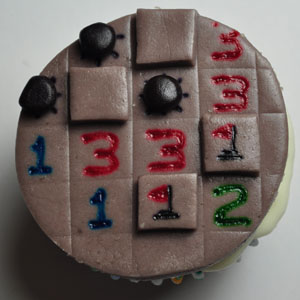
The object is simple: how many games can you identify from their cupcake representations?
Linking without comment... where was that on the list again?


@echo off
setlocal enabledelayedexpansion

set NUMROWS=10
set NUMCOLS=10

REM // These start at 10 so they're always 2 digits
set nFirstRow=10
set /a nLastRow=nFirstRow+NUMROWS-1
set nFirstCol=10
set /a nLastCol=nFirstCol+NUMCOLS-1

REM // This is a capital oh, not zero
set ON=O
set OFF=.
set Var1=0
set Var3=1

:Initialize
REM // CELLrrcc
for /L %%I in (%nFirstRow%,1,%nLastRow%) do (
 for /L %%J in (%nFirstCol%,1,%nLastCol%) do (
   set CELL%%I%%J=%OFF%
 )
)

if %1[==[ goto :Pattern5
goto :Pattern%1
:Pattern1
REM // What is it?
set CELL1110=%ON%
set CELL1111=%ON%
set CELL1112=%ON%
goto :Render
:Pattern2
REM // What is it?
set CELL1011=%ON%
set CELL1112=%ON%
set CELL1210=%ON%
set CELL1211=%ON%
set CELL1212=%ON%
goto :Render
:Pattern3
REM // What is it?
set CELL1314=%ON%
set CELL1315=%ON%
set CELL1413=%ON%
set CELL1414=%ON%
set CELL1514=%ON%
goto :Render
:Pattern4
REM // What is it?
set CELL1314=%ON%
set CELL1413=%ON%
set CELL1414=%ON%
set CELL1415=%ON%
set CELL1514=%ON%
goto :Render
:Pattern5
for /L %%I in (%nFirstRow%,1,%nLastRow%) do (
 for /L %%J in (%nFirstCol%,1,%nLastCol%) do (
   if !RANDOM! GTR 16383 set CELL%%I%%J=%ON%
 )
)

:Render
cls
set Var2=0
for /L %%I in (%nFirstRow%,1,%nLastRow%) do (
 set ROW=
 for /L %%J in (%nFirstCol%,1,%nLastCol%) do (
   set ROW=!ROW!!CELL%%I%%J!
   if !CELL%%I%%J!==%ON% set /a Var2=Var2+1
 )
 echo !ROW!
)
echo P:%Var2% / G:%Var1%
if %Var2%==0 goto :EOF
if %Var3%==0 goto :EOF

:Advance
set Var2=0
set nRow=%nFirstRow%
set Var3=0
:AdvanceRow
set nCol=%nFirstCol%
if %nRow%==%nFirstRow% (
 set nPrevRow=%nLastRow%
 set /a nNextRow=%nRow% + 1
) else if %nRow%==%nLastRow% (
 set /a nPrevRow=%nRow% - 1
 set nNextRow=%nFirstRow%
) else (
 set /a nPrevRow=%nRow% - 1
 set /a nNextRow=%nRow% + 1
)
:AdvanceCol
if %nCol%==%nFirstCol% (
 set nPrevCol=%nLastCol%
 set /a nNextCol=%nCol% + 1
) else if %nCol%==%nLastCol% (
 set /a nPrevCol=%nCol% - 1
 set nNextCol=%nFirstCol%
) else (
 set /a nPrevCol=%nCol% - 1
 set /a nNextCol=%nCol% + 1
)
set nSum=0
if !CELL%nPrevRow%%nPrevCol%!==%ON% set /a nSum=nSum+1
if !CELL%nPrevRow%%nCol%!==%ON% set /a nSum=nSum+1
if !CELL%nPrevRow%%nNextCol%!==%ON% set /a nSum=nSum+1
if !CELL%nRow%%nPrevCol%!==%ON% set /a nSum=nSum+1
if !CELL%nRow%%nNextCol%!==%ON% set /a nSum=nSum+1
if !CELL%nNextRow%%nPrevCol%!==%ON% set /a nSum=nSum+1
if !CELL%nNextRow%%nCol%!==%ON% set /a nSum=nSum+1
if !CELL%nNextRow%%nNextCol%!==%ON% set /a nSum=nSum+1
set NEWCELL%nRow%%nCol%=!CELL%nRow%%nCol%!
if %nSum% GTR 3 (
 set NEWCELL%nRow%%nCol%=%OFF%
) else if %nSum%==3 (
 set NEWCELL%nRow%%nCol%=%ON%
) else if %nSum% LSS 2 (
 set NEWCELL%nRow%%nCol%=%OFF%
)
if not !NEWCELL%nRow%%nCol%!==!CELL%nRow%%nCol%! set /a Var3=Var3+1

set /a nCol=%nCol% + 1
if not %nCol% GTR %nLastCol% goto :AdvanceCol
set /a nRow=%nRow% + 1
if not %nRow% GTR %nLastRow% goto :AdvanceRow

for /L %%I in (%nFirstRow%,1,%nlastRow%) do (
 for /L %%J in (%nFirstCol%,1,%nLastCol%) do (
   set CELL%%I%%J=!NEWCELL%%I%%J!
 )
)
set /a Var1=Var1 + 1
goto :Render
.png)


@echo off
setlocal enabledelayedexpansion

set Framefile=dosref.html
set TOCfile=TOC.html

echo ^<html^> >%Framefile%
echo ^<head^> >>%Framefile%
echo ^<title^>DOS Reference^</title^> >>%Framefile%
echo ^</head^> >>%Framefile%
echo ^<frameset cols="120,*"^> >>%Framefile%
echo   ^<frame src="%TOCfile%"/^> >>%Framefile%
echo   ^<frame name="showframe"/^> >>%Framefile%
echo ^</frameset^> >>%Framefile%
echo ^</html^> >>%Framefile%

echo ^<html^>^<head^> >%TOCfile%
echo ^<title^>Table of Contents^</title^> >>%TOCfile%
echo ^</head^>^<body^> >>%TOCfile%

for /f "usebackq skip=5 tokens=1" %%i in (`help ^|sort`) do (
 if not exist %%i.txt (
   help %%i > %%i.txt
   if ERRORLEVEL 1 (
     echo ^<a href="%%i.txt" target="showframe"^>%%i^</a^>^<br/^> >>%TOCfile%
   ) else (
     del %%i.txt
   )
 )
)

echo ^</body^>^</html^> >>%TOCfile%